
Routine Operations – Best practices for use
Document Objective
This document technically describes the best practices recommended by our specialists to keep Collective IQ ITAM operating with consistently up-to-date information.
Each section presents a specific system functionality, focusing on the analysis, organization, and extraction of consolidated information. For further details on each functionality, refer to the specific section of the corresponding module, as illustrated throughout the document.
The main objective of this material is to guide the operation of the platform, without going into the conceptual or technical aspects of each module.
Hardware inventory
Objective
Ensure the integrity and consistency of hardware inventory data by identifying and correcting duplicate device records, validating key identifiers such as hostnames and serial numbers, and maintaining an up-to-date and trustworthy inventory for operational and compliance purposes.
Purpose
Describe how operators use the Hardware Inventory module within Collective IQ ITAM to maintain accurate, consistent, and reliable device records, supporting audit activities, reporting accuracy, and effective asset management.
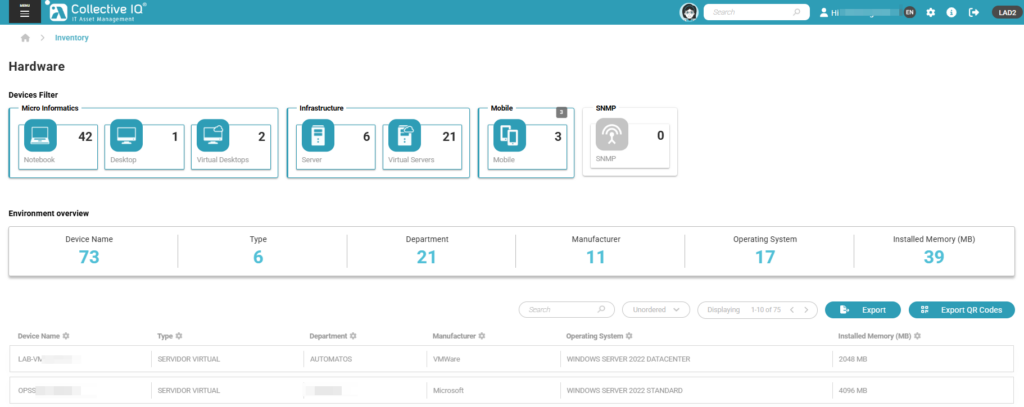
Inventory – Identifying Devices with Duplicate Names
Procedure
- Access: Menu > Inventory.
- Use the Export option to generate the complete list of devices.
- Save the file in CSV format.
- Open the CSV file with a spreadsheet application (e.g., Excel or Google Sheets).
- Locate the column corresponding to Device Name.
- Compare the
Serial_Numbercolumn for each device record. - If duplication occurs only in the
Hostnameand the devices are reporting data normally, adjust the device names as needed. - If duplication occurs in the
Serial_Number, remove the record of the device with the oldest data reporting date. - Use spreadsheet tools to: Sort data by device name; or Automatically identify duplicate values.
- Analyze the duplicated records according to operational requirements.
General Notes
- The Collect Date represents the last time data was received by the system, not necessarily the device’s local time.
- CSV exports reflect the inventory state at the time of extraction.
- Periodic reviews are recommended to ensure inventory consistency and data freshness.
Software Inventory
Objective
Enable effective software governance by classifying detected software according to approval status and environment, maintaining a complete change history, identifying devices with non-approved software, and supporting audit, compliance, and remediation activities through alerts and reporting.
Purpose
Describe how operators manage, classify, and control software usage within Collective IQ ITAM, ensuring visibility, traceability, and compliance by identifying approved and non-approved software across different environment types.
Inventory – Software Management
Procedure
- Access: Menu > Inventory > Software > Software Approval.
- Review the list of detected software.
- Classify each software using one of the following statuses:
- Approved
- Not Approved
- Undefined
- Apply the classification according to the environment type:
- End-User Computing: Notebook, Desktop, Virtual Desktop
- Infrastructure: Server, Virtual Server
- When changing the status, provide a justification for the classification.
- The system will automatically record the Change History, including:
- User account that performed the change
- Assigned status
- Justification (reason)
- Date and time of the change
Red Software Alerts
Purpose
To identify devices that contain software classified as Not Approved in the environment.
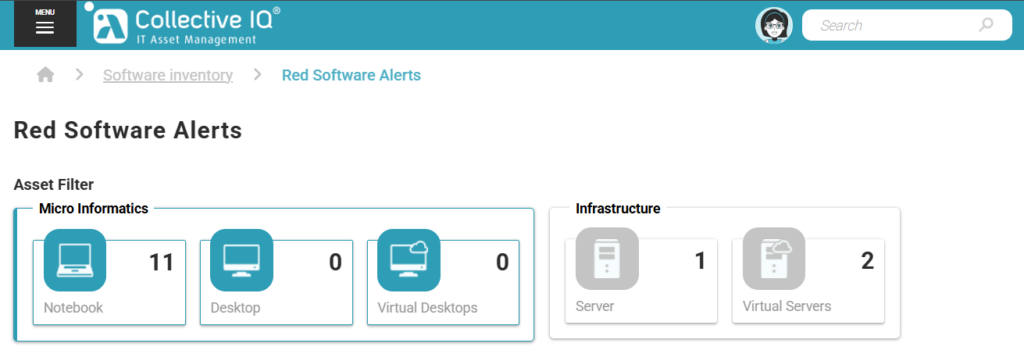
Procedure
- Access: Menu > Inventory > Software > Red Software Alerts.
- Review the list of devices flagged due to the presence of Not Approved software.
- Use available filters to narrow the results, including:
- Department
- Select one or more devices from the list.
- View the software installed on the selected devices.
Reporting on Non-Approved Software
Purpose
To generate reports that identify devices with non-approved software for audit, compliance, or remediation purposes.
Procedure
- From the Red Software Alerts view, apply the desired filters (for example, by department).
- Select the relevant devices.
- Generate reports listing:
- Devices containing Not Approved software
- Associated software details
- Export the report as required for compliance or operational follow-up.
Licensing
Objective
Enable effective and centralized software license management by controlling license contracts and SKUs, monitoring license consumption and availability, validating compliance status, and supporting proactive actions to prevent licensing risks and optimize software asset utilization across the environment.
Purpose
Describe how operators manage software licensing within Collective IQ ITAM, providing a structured approach to contract and SKU management, license balance analysis, consumption validation, and compliance monitoring, ensuring accurate control, audit readiness, and effective license governance.
Status Analysis and Compliance Monitoring
Objective
Analyze the overall license balance by comparing purchased licenses with consumed licenses, providing clear visibility into license availability, usage, and compliance status across the environment.
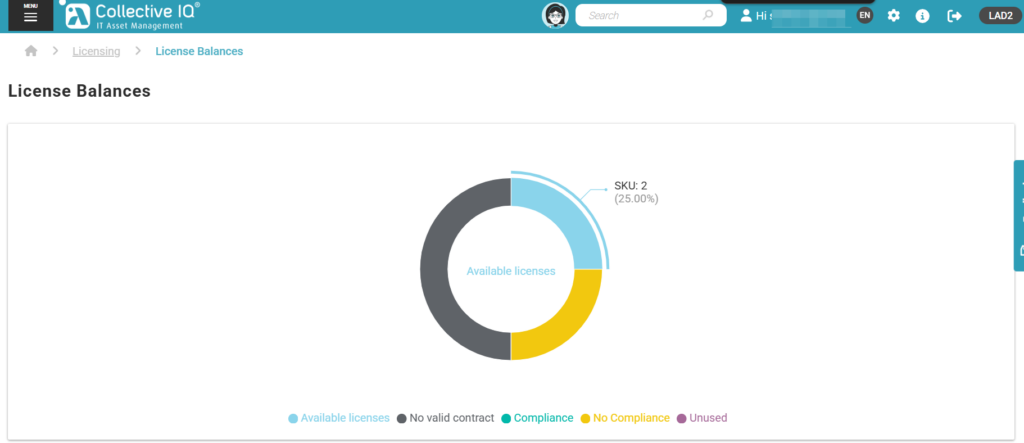
Capabilities
- View license distribution by status, including:
- Available Licenses
- Not Valid Contract (expired contracts)
- Compliance
- Non-Compliance (installed software exceeding licensed quantities)
- Unused (available but not assigned licenses)
- View the total number of licenses available per contract or SKU.
- Analyze license consumption across the environment.
- Identify license surpluses or shortages to support compliance and optimization actions.
Periodic Validation of Contracts Near Expiration
Objective
Ensure ongoing compliance with license quantity and validity by periodically reviewing license contracts approaching or reaching their expiration date, allowing timely corrective actions and preventing compliance risks.

Procedure
- Access: Menu > Licences Balance.
- In the licenses table, click Details for the desired license.
- Verify the contract date in the “Available to” field.
- Check the Status field and confirm whether it is marked as “Expired.”
- If the license is expired, follow the organization’s established procedures to maintain compliance with license quantity and validity.
License Consumption Validation
Objective
To validate which products are consuming licenses and ensure compliance with licensing agreements.
Capabilities
- Validate consumed licenses by product
- Cross-check license usage against contractual limits
- Support audit and compliance processes
Almaden License Consumption Overview
Objective
To provide visibility into devices that consume Almaden application licenses and present a consolidated license balance.
Capabilities
- View devices that consume Almaden licenses
- Analyze license usage per Almaden application
- Maintain a consolidated license balance for Almaden products
Reports
Objective
Enable proactive identification and analysis of devices with data submission gaps by defining downtime thresholds, visually classifying device status, and supporting timely corrective actions to prevent data loss, configuration drift, and compliance issues across the environment.
Purpose
Describe how operators monitor device availability and data collection continuity within Collective IQ ITAM by identifying devices that have stopped reporting data, supporting operational visibility, configuration validation, and compliance.
Reports – Device Downtime
Purpose
This report allows operators to identify devices that have not sent data to Collective IQ ITAM within a defined time range, supporting availability monitoring, configuration validation, and compliance analysis.
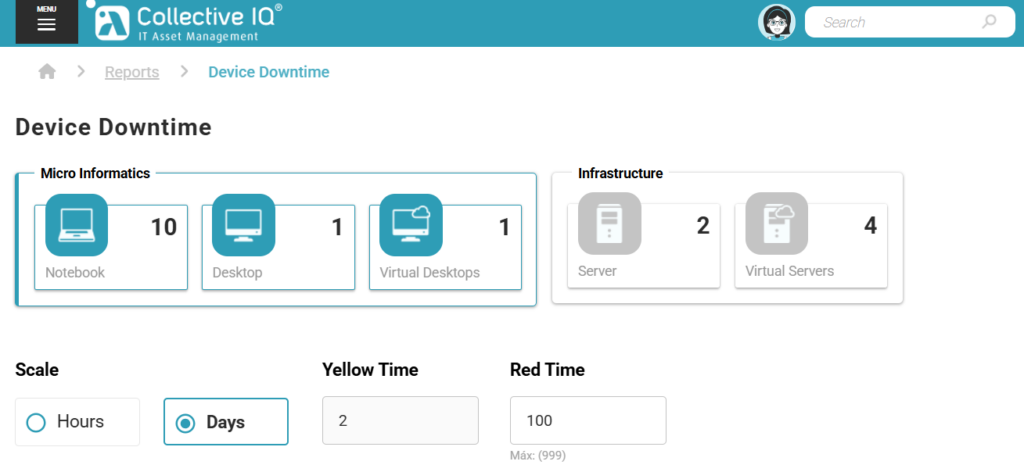
Accessing the Device Downtime Report
Procedure
- Access: Menu > Inventory > Reports > Device Downtime.
- Select the environment type:
- End-User Computing (Microcomputing)
- Infrastructure
- Configure the time range used to detect devices without data submission:
- Define the interval in days or hours.
- Set the status thresholds:
- Yellow status: detection threshold (warning)
- Red status: alert threshold
- Based on the configured parameters, devices that have not sent data within the defined interval will be evaluated.
Analyzing Device Downtime
Behavior
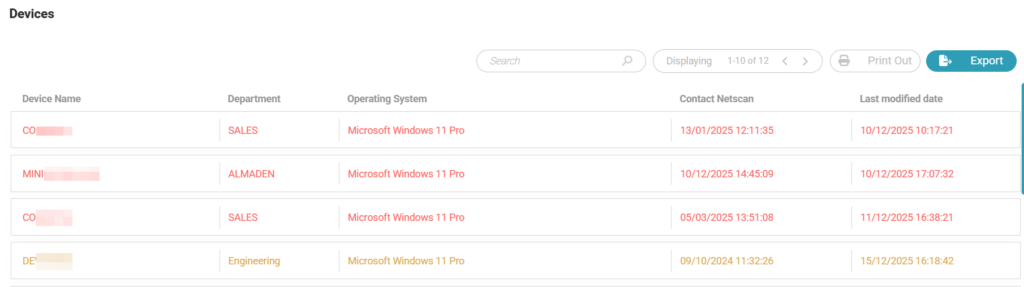
- Devices that match the configured criteria are listed in the table displayed below the filters.
- Each device is visually classified according to its status:
- Yellow: device approaching the alert threshold
- Red: device exceeding the alert threshold
Exporting Device Downtime Data
Procedure
- After reviewing the listed devices, select the Export option.
- Export the results to a CSV file.
- The exported file will include:
- Devices classified with Yellow status
- Devices classified with Red status
Operational Recommendation
Regularly analyze the devices listed in the Device Downtime report to prevent potential configuration drift, data collection gaps, or compliance deviations within the environment.
Life Cycle
Objective
Provide a structured and centralized approach to managing the complete asset lifecycle within Collective IQ ITAM, ensuring accurate control over contracts, asset associations, operational status, and depreciation rules, while supporting compliance, traceability, and effective asset governance throughout all lifecycle stages.
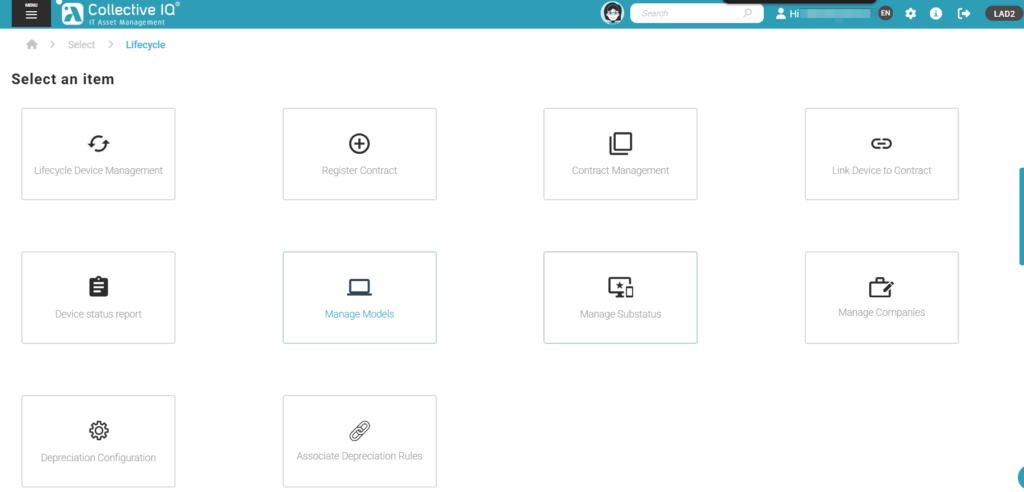
- Access: Menu > Inventory > Lifecycle.
Purpose
This section describes how operators manage the full lifecycle of assets within Collective IQ ITAM, including contract registration, asset association, lifecycle control, and depreciation rules.
Asset Lifecycle Management
Objective
To manage the operational status of assets throughout their lifecycle.
Capabilities
- Track lifecycle stages of devices
- Update asset status as they move between lifecycle phases
- Maintain consistency between inventory and contractual data

