
Routine Operations – Inventory > Hardware
Inventory > Hardware
This section describes how users can leverage the features of the Inventory > Hardware page, which is designed for viewing, filtering, analyzing, and exporting detailed information about hardware assets collected by Collective IQ ITAM.
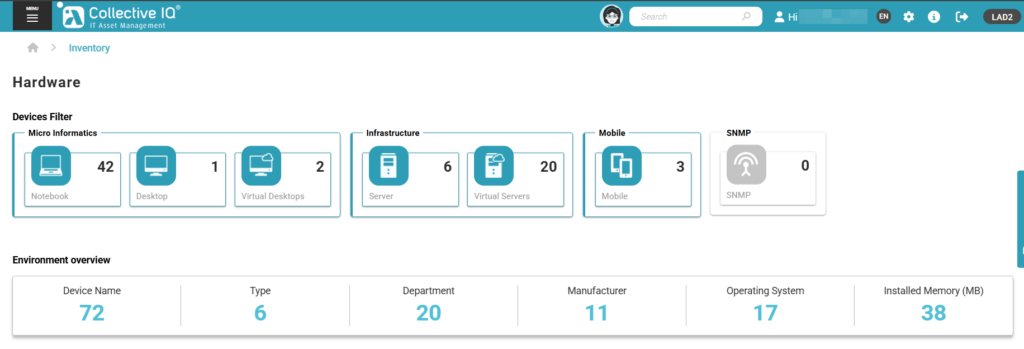
Micro Informatics
The page allows assets to be filtered by hardware category, enabling easier navigation and segmented analysis of the hardware inventory.
Covers individual and corporate-use devices, allowing users to:
- View the workstation inventory.
- Identify configuration standards and deviations.
Notebook
Displays only notebook devices.
Used for mobility management, hardware refresh planning, and compliance of mobile assets.
Desktop
Displays only physical desktop devices.
Supports standardization analysis and evaluation of installed capacity.
Virtual Desktops
Displays virtual desktop environments.
Supports management of VDI and remote desktop environments.
Infrastructure
Server
Lists physical servers.
Enables analysis of capacity, manufacturer, and operating system information.
Virtual Servers
Displays virtual machines.
Supports control, consolidation, and optimization of virtualized environments.
Mobile
Displays registered mobile devices.
Supports management and control of corporate mobile assets.
SNMP
Lists devices whose data is collected via SNMP.
Used for inventory of network and compatible infrastructure equipment.
Available Columns and Filters
Devices are displayed in a tabular format. Each column can be used both for visualization and data filtering.
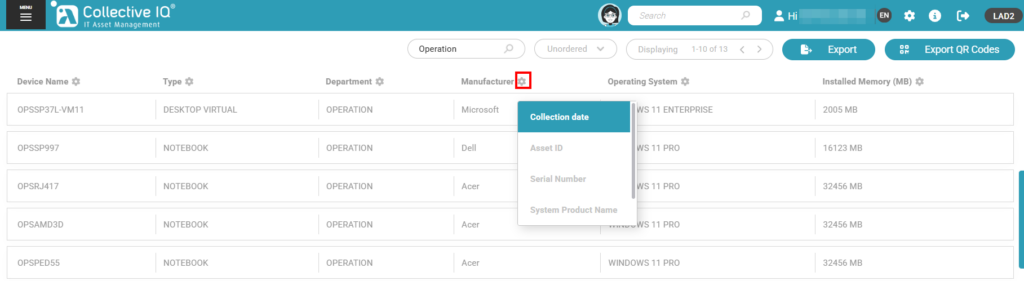
Device Name (Hostname)
Identifies the asset on the network.
Clicking the name opens the detailed device record.
Type
Indicates the hardware type (notebook, desktop, server, etc.).
Enables quick filtering by category.
Department
Displays the organizational unit responsible for the asset.
Supports allocation analysis and chargeback/showback models.
Manufacturer
Identifies the device manufacturer.
Supports contract management, warranty tracking, and standardization efforts.
Operating System
Displays the installed operating system.
Helps identify obsolete or unsupported versions.
Installed Memory (MB)
Displays the detected amount of RAM.
Used for capacity planning and performance analysis.
Collection Date
Indicates the date of the most recent data collection.
Used to validate data freshness.
Asset ID
Unique identifier of the asset within Collective IQ ITAM.
Used for traceability and integration with other systems.
Serial Number
Manufacturer’s serial number.
Essential for audits and asset tracking.
Current User
Displays the most recent user logged into the device.
Helps identify asset ownership and responsibility.
Export Features

Data Export
Allows exporting the device list.
Used for external reporting, audits, and additional analysis.
QR Code Export
Generates QR Codes for selected devices.
QR Codes can be printed and physically attached to equipment.
When scanned, the QR Code automatically redirects the user to the device’s detailed record in Collective IQ ITAM.
Accessing the Device Details
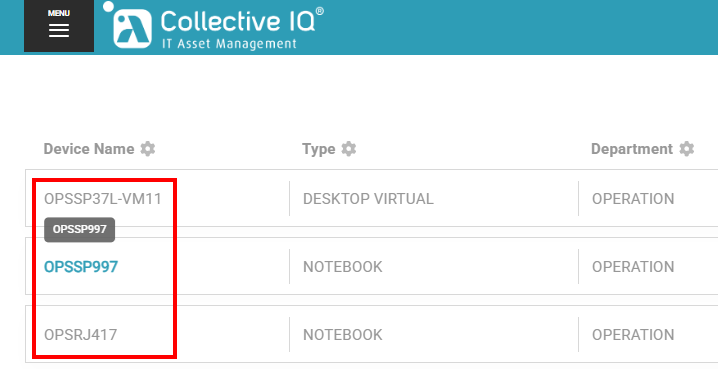
Users can access the detailed device record by clicking the Hostname in the list.
The device record centralizes complete hardware and software information, data collection history, and agent status for the selected asset.

