
SKU Management
SKU Management
This section allows you to create, edit, and manage SKUs used for software licensing control. Here you can define license characteristics, usage rules, and detection criteria to ensure accurate license compliance and visibility.
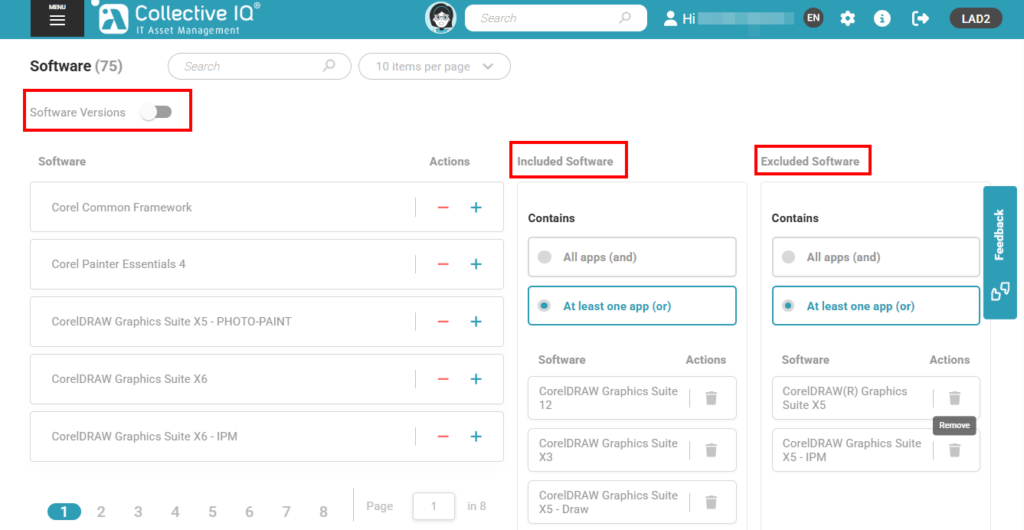
Add and remove software from the SKU you will create to perform software balancing.
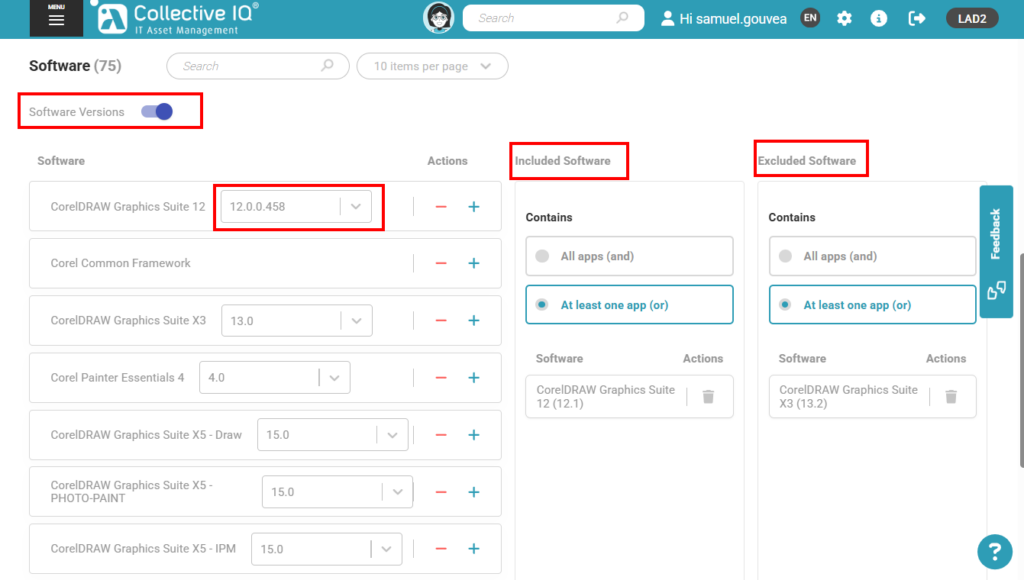
When enabling “Software Versions”, it is possible to add or remove software from this SKU based on the installed software version. This improves software balancing, which can then be performed only on the selected software versions.
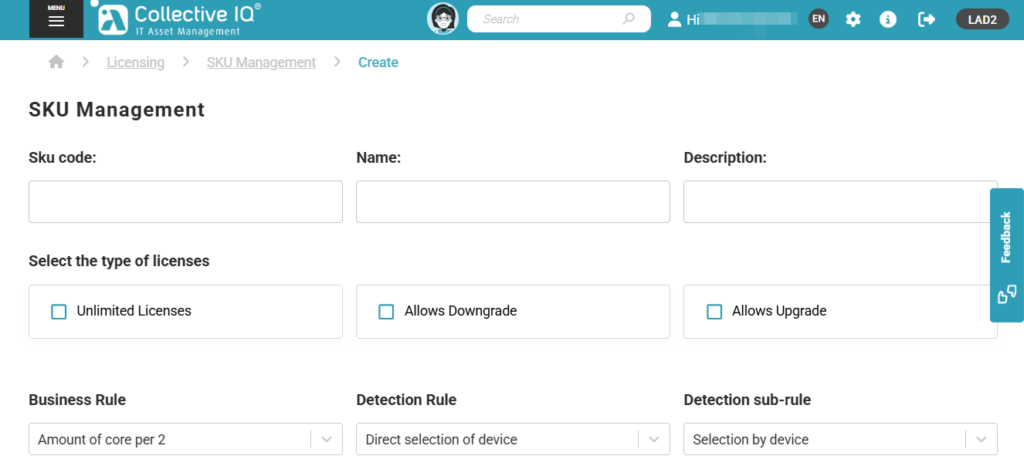
SKU Code
Enter a unique identifier for the SKU.
This code represents a license grouping and may be associated with multiple software titles, editions, or versions. The SKU Code is used internally for license tracking, compliance calculations, and reporting, and should follow a consistent naming standard to simplify management.
Name
Provide a clear and representative name for the SKU.
This name may reference a group of related software titles or versions, as multiple software entries can be associated with the same SKU. The name should clearly indicate the licensed product or software family to simplify identification and reporting.
Description
Add a detailed description explaining the scope of the SKU.
Use this field to specify that the SKU includes multiple software applications, editions, or versions, and to document any relevant licensing conditions, coverage rules, or grouping criteria applied to the associated software.
Select the Type of Licenses
Unlimited Licenses
Enable this option if the software does not have a predefined license limit. When selected, license usage will not be restricted by quantity and compliance alerts related to license count will not be generated.
Allows Downgrade
Enable this option to allow the use of lower software versions under the same license. This is useful when the license agreement permits the installation of previous versions of the product.
Allows Upgrade
Enable this option to allow the use of newer software versions under the same license. This option should be enabled when the license agreement includes upgrade rights.
Business Rules
Quantity of Software Packages Installed
Defines license consumption based on the total number of software packages installed on a device. Each detected installation contributes to the license usage calculation according to the defined SKU rules.
Total Number of CPUs per Device
Calculates license consumption based on the total number of physical CPUs installed on the device. This rule is commonly used for server licensing models tied to processor count.
Total Number of Cores per Device
Determines license usage by considering the total number of CPU cores available on the device, regardless of how many physical processors are installed.
Number of Cores per CPU
Calculates license consumption based on the number of cores per individual CPU. This rule is useful when licensing terms apply per processor core configuration.
Amount of Core per 2
Defines license consumption by grouping CPU cores in sets of two. For example, every two cores detected count as one licensing unit, in accordance with specific vendor licensing models.
Detection Rules
Detect Installed Software
Enables automatic detection of installed software on devices. The platform scans the system and matches installations against the defined detection criteria to associate them with the corresponding SKU.
Direct Selection of Device
Allows manual selection of specific devices to which the SKU and licensing rules will be applied, bypassing automatic detection mechanisms.
Detection Sub-rules
Selection by Type of Device
Filters the detection scope based on the device type, such as workstation, laptop, or server, ensuring that the SKU applies only to the appropriate categories.
Selection by Department
Restricts detection and license application to devices associated with a specific department, supporting organizational and administrative segmentation.
Selection by Device
Allows precise selection of individual devices for detection and license application, providing granular control over where the SKU rules are enforced.
