CIQ ITAM Public APIs
Collective IQ ITAM Public API
Simplified Integration and Automation
The CIQ ITAM Public API module provides APIs for querying information on Hardware, Software, Performance, and more. It enables external systems to access data directly from CIQ ITAM. Through this API, it is possible to automate queries, updates, and integrations with other IT management tools.
This functionality is essential for companies looking to enhance process efficiency by eliminating repetitive manual actions and enabling the creation of customized workflows.
With the CIQ ITAM Public API, your IT team can integrate CIQ ITAM data and commands with systems such as ERPs, monitoring platforms, or internal scripts, optimizing management and promoting greater operational agility and accuracy.
SmartCenter public APIs make all inventory data available as well as the option to extract it in a report, delivered in JSON format.
It can be used for integration with tools that make REST API calls and accept JSON as the delivery data type.
Query Capabilities
The Collective IQ ITAM public API is REST-based and provides multiple endpoints, each segmented by data type. Each segment below represents a specific URL, enabling targeted queries according to the desired data domain.
Responses are returned in JSON format, and the fields listed below represent exactly what can be queried, regardless of the values returned by each device.
Hardware Data (Workstations)
Endpoint dedicated to the inventory of desktops and notebooks.
Available query fields:
computer_name;
department_name;
department_hierarchy;
so_string;
so_version;
system_manufacturer;
computer_type;
machine_net_ipaddress;
bios_release_date;
machine_ipdomain;
is_virtual_machine;
system_product_name;
system_serial_number;
machine_id;
os_bits;
login_name;
cpu_identity;
cpu_generation;
cpu_type;
cpu_clock;
cpu_clock_in_MHz;
cpu_clock_in_GHz;
core_num;
physical_cpu_amount;
logical_cpu;
memory_range;
installed_mem;
disk_total;
disk_used;
top_user;
percent_top_user;
dns_servers;
machine_gateway;
collect_date;
status;
installed_agent_type;
installed_agent_version;
update_date;
last_login;
installed_mem_in_GB;
disk_total_in_GB;
disk_used_in_GB;
installed_mem_in_MB;
disk_total_in_MB;
disk_used_in_MB
Software (Workstations)
Endpoint dedicated to the inventory of software installed on workstations.
Available query fields:
sw_id;
computer_name;
department_name;
software_name;
normalized_software_name;
is_licensable;
software_version;
software_manufacturer;
homologation_status;
instalation_date;
machine_type;
machine_id;
family;
label;
category_name;
category_description;
group_name;
group_description;
register_key
Monitor
Endpoint responsible for information related to monitors associated with workstations.
Available query fields:
machine_id;
computer_name;
computer_type;
collect_time;
department_name;
so_string;
system_serial_number;
monitors
Server Hardware
Endpoint dedicated to the inventory of physical and virtual servers.
Available query fields:
computer_name;
department_name;
so_string;
so_version;
system_manufacturer;
computer_type;
machine_net_ipaddress;
bios_release_date;
machine_ipdomain;
is_virtual_machine;
system_product_name;
system_serial_number;
machine_id;
cpu_identity;
cpu_generation; cpu_type;
cpu_clock;
cpu_clock_in_MHz;
cpu_clock_in_GHz;
core_num;
cpu_quantity;
cpu_active;
memory_range;
installed_mem;
disk_total;
disk_used;
collect_date;
status;
installed_agent_type;
installed_agent_version;
update_date;
installed_mem_in_GB;
disk_total_in_GB;
disk_used_in_GB;
installed_mem_in_MB;
disk_total_in_MB;
disk_used_in_MB;
os_bits
Server Software
Endpoint dedicated to the inventory of software installed on servers.
Available query fields:
sw_id;
computer_name;
department_name;
software_name;
normalized_software_name;
is_licensable;
software_version;
software_manufacturer;
homologation_status;
instalation_date;
machine_type;
machine_id;
family;
label;
category_name;
category_description;
group_name;
group_description
SNMP
Endpoint for querying network devices monitored via SNMP, such as switches and routers.
Available query fields:
Available query fields:
name;
object_id;
ip_address;
department_name;
contact;
location;
monitored_by;
machine_id;
dns_name;
up_time;
agent_id;
description;
interfaces
Available interface fields:
interface_name;
index;
ip_address;
type;
mtu;
speed;
admin_status;
operational_status;
mac_address
Custom Form – Workstations
Dynamic endpoint based on custom forms created by the user for workstations.
Characteristics:
- Fields returned by the API correspond exactly to the fields defined by the user in the platform.
- Flexible structure with no fixed schema.
Custom Form – Servers
Dynamic endpoint based on custom forms created by the user for servers.
Characteristics:
- Fields exposed by the API fully reflect the fields configured by the user.
- Allows enrichment of the standard server inventory.
Desktop Performance – General Details
Endpoint providing consolidated general performance indicators for workstations.
Available query fields:
machine_id;
computer_name;
login_name;
department_name;
avg_cpu;
avg_mem;
perc_disk
Desktop Performance – CPU Process
Endpoint focused on CPU consumption by process on workstations.
Available query fields:
machineId;
loginName;
computerName;
process;
value
Desktop Performance – Memory Process
Endpoint focused on memory consumption by process on workstations.
Available query fields:
machineId;
loginName;
computerName;
process;
value
Inventory Software – Licensing
Endpoint focused on Software Licensing. It allows retrieving software licensing information using GET and updating software licensing details using POST.
Available query fields GET:
Get a complete list of software installed on your account. You can filter by software name and approval status.
search; (Filter by software name. Type any part of the text and the search will return all records that contain it, without the need for wildcard characters like *.)

approved; (Filter by software approval status. You should fill this field with 'true' if you want to filter software with an approved status.)

obsolete; (Filter by software approval status. You should fill this field with 'true' if you want to filter software with an obsolete status.)

unapproved; (Filter by software approval status. You should fill this field with 'true' if you want to filter software with an unapproved status.)

unknown; (Filter by software approval status. You should fill this field with 'true' if you want to filter software with an unknown status.)
Available query fields POST:
You can filter by a date range, event type (removed, installed, present), and search by part of the software name.
machineId;

Example Body:
{
  "startDate": "2026-02-10",
  "endDate": "2026-02-20",
  "search": "notepad",
  "event": [
    "removed",
    "installed"
  ]
}

Response 200:
[
  {
    "machineId": "123456789",
    "machineName": "DEVICE",
    "date": "20/02/2026 16:42",
    "event": "removed",
    "software": "Notepad++ (64-bit x64)",
    "version": "8.9",
    "manufacturer": "Notepad++ Team",
    "currentUser": "user"
  }
]
Available query fields POST:
You can create or update the approval status of one or more software and describe the reason for the new status.
No Parameters

Example Body:
{
  "listSwId": [
    123,
    321
  ],
  "status": "unapproved",
  "reason": "Reason for approval"
}

Response 200:
{
  "status": true
}
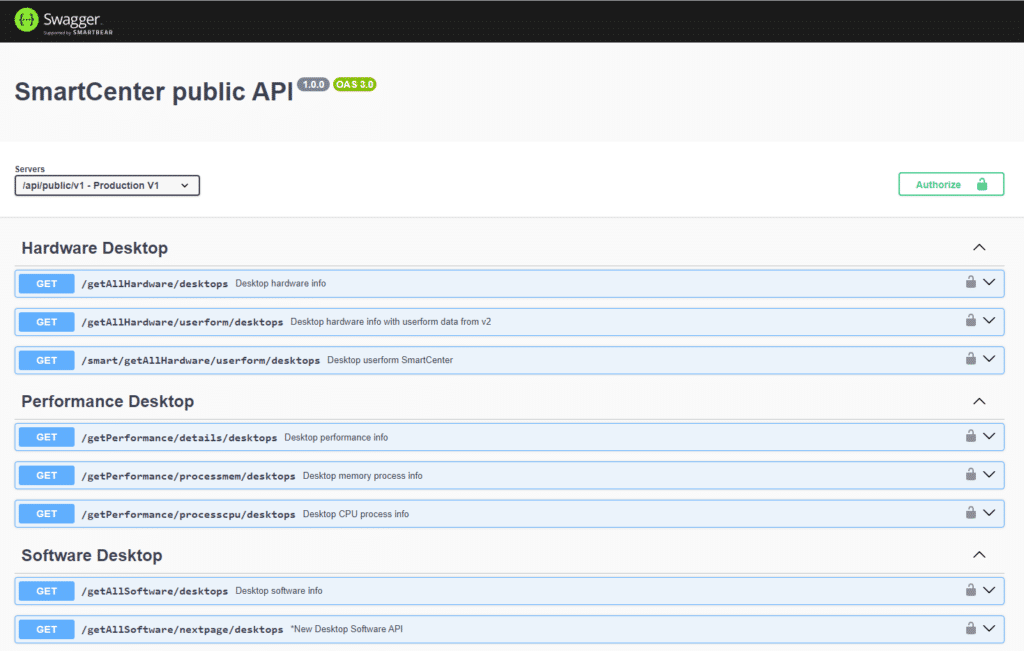
Collective IQ ITAM – SWAGGER
The Collective IQ ® ITAM public APIs are documented using Swagger:
LAD1: https://lad1-smartcenter.almaden.app/api/public/almaden-docs/
LAD2: https://lad2-smartcenter.almaden.app/api/public/almaden-docs/