
Agent Download
How to Download Agents
How to Download and Configure Agents
The Collective IQ ITAM allows technicians to generate and download silent installation packages for collector agents and, optionally, software distribution agents.
Access
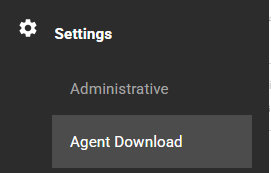
Log in to the SmartCenter portal using the target environment account and navigate to:
Menu> Settings > Agent Download
Agent Types
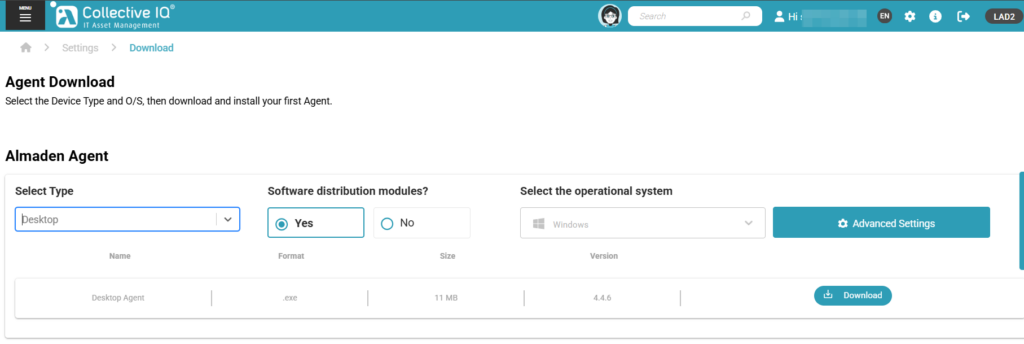
Select the object type to be managed:
- Desktop: For workstations (Desktop Agent – ADA).
- Server: For physical or virtual servers.
Package Options
- Standard Package (Collector Only – Software distribution modules = NO)
Includes only the collector agent. - Package with Distribution Agents (Software distribution modules = YES)
Includes AAU, SRC, and ASU agents (available only for supported operating systems).
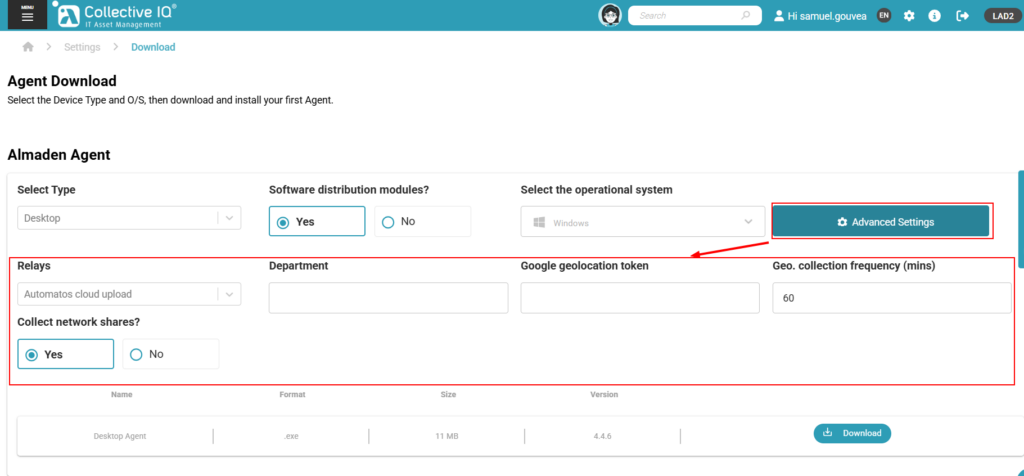
Custom Package (Advanced Settings)
Use Advanced Settings to customize data transmission and identification parameters:
- Department: Mandatory for asset registration.
- Google Geolocation API Token (optional): Enables geolocation data collection.
- Geolocation Collection Frequency (optional).
Data Transmission Modes
- Cloud Upload
Sends data directly to Almaden Cloud. Requires direct internet access. - Central Relay
Sends data through a relay installed in the customer environment.
Requires configuration of a Primary Relay (and optional secondary relay). - Central Relay + Local Relay (Hybrid)
Uses a central relay as primary and a local relay as fallback.
Recommended only for specific scenarios due to firewall impact.
