AlmaIQ in Collective IQ DEX®
Overview — What AlmaIQ Is
AlmaIQ is an intelligent virtual concierge available within Microsoft Teams. It leverages data from Collective IQ (DEX/ITAM) and knowledge from AlmaKnowledge to provide answers in natural language. The platform is designed to support corporate environments, assisting users with IT, HR, and internal process-related questions.
Architecture and Components
- Conversational layer: Microsoft Teams
- Technical data source: Collective IQ (DEX)
- Knowledge base: AlmaKnowledge
- Integration with Microsoft Entra ID (Azure AD) for identity and access control
- No requirement for complex intents or conversational flows
- Context-aware responses based on the user and device
- Secure, enterprise-ready environment
How It Works in Practice
A user asks a question → AlmaIQ queries relevant data sources → provides an actionable response.
Capabilities include:
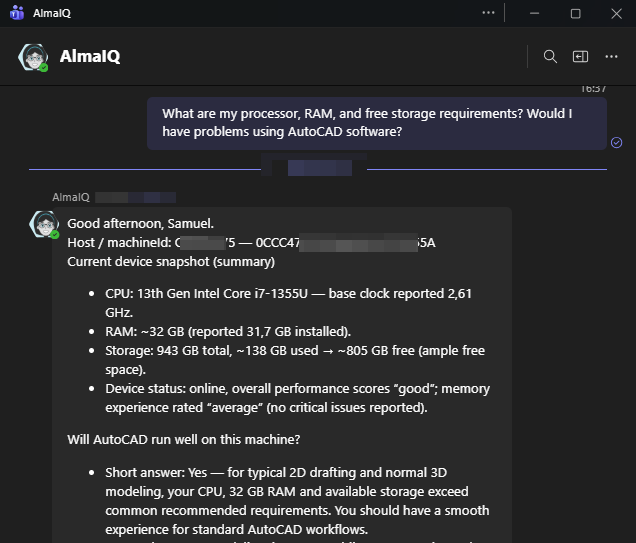
- Automatic technical diagnostics (CPU, RAM, disk, network)
- Search and retrieval of company policies and procedures
- Automatic ticket creation when required
- Multilingual support
Key Differentiators vs. Traditional Chatbots
- No need to configure intents or conversation flows
- Responses based on real-time environment data
- Designed specifically for enterprise support scenarios
- Action-oriented responses (diagnosis + recommended action + ticket creation)
- Ability to explain and contextualize DEX indicators
User Interaction
User Interaction
Conversations with AlmaIQ take place through an application within Microsoft Teams. Users access the assistant after the application is integrated with Microsoft Entra ID (Azure AD), ensuring secure authentication and allowing AlmaIQ to deliver personalized, context-aware responses based on the authenticated user and their associated devices.