
Log files
Log files – Distribution Wizard
Log Files – Distribution Wizard
This log describes a remote control implementation based on RFB (VNC) extended with additional automation channels, where not only remote screen access is used, but also integrated authentication, file transfer, and remote command execution.
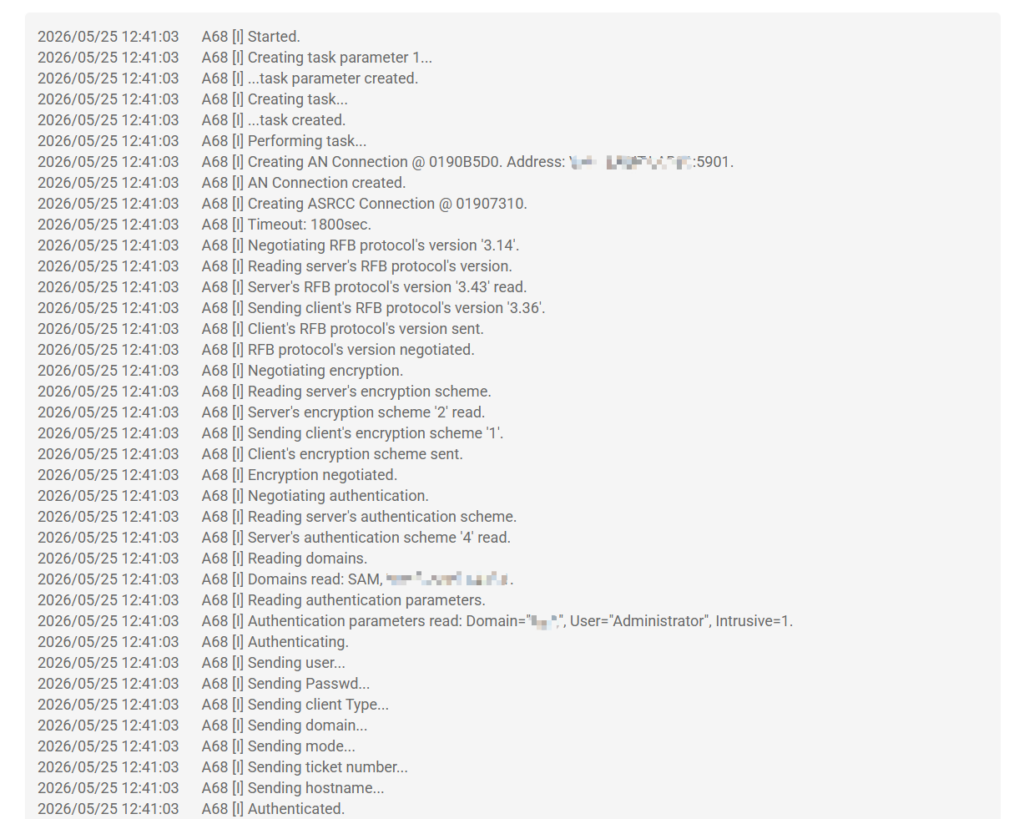
Below is the breakdown of the flow:
1. Connection and RFB negotiation (port 5900, 5901)
Initial step
Creating AN Connection @ ... Address: VM-CLIENT-LAB01:5901- Opens a TCP connection to the VNC (RFB) server on port 5901
- “AN Connection” = main communication channel
2. Protocol negotiation
Negotiating RFB protocol version
Server: 3.43
Client: 3.36- Client and server agree on a compatible RFB version
- Ensures both sides understand graphical data and command formats
3. Encryption
Negotiating encryption
Server scheme '2'
Client scheme '1'
Encryption negotiated- Defines encryption method (TLS or custom VNC encryption)
- Protects:
- credentials
- session commands
- session data
4. Authentication (user, domain, and ticket)
This is the most important part of the log:
Authentication scheme '4'
Domains read: Domain, VM-CLIENT-LAB01
User="Administrator"
Domain="Domain"
Intrusive=1
Sending user...
Sending password...
Sending domain...
Sending ticket number...
Sending hostname...
Authenticated
4.1 Context identification
The server indicates support for enterprise authentication:
- Windows/AD domain (
Domain, VM-CLIENT-LAB01) - Integrated OS authentication support
4.2 Credentials sent
The client sends:
- Username (Administrator)
- Password
- Domain (SAM)
- Ticket (session token)
- Client hostname
4.3 Validation
The server validates via:
- Windows Security Authority (LSASS)
- Or Active Directory backend (Kerberos/NTLM depending on implementation)
Result:
Authenticated
Authentication response '0'0= success
5. Control channel creation (ASRCC)
ASRCC Connection created
Transfer Session started
This introduces a key difference: beyond RFB, the system creates a parallel advanced control channel.
Likely:
- ASRCC = “Advanced Session Remote Control Channel” (proprietary name)
- Not part of standard RFB
6. File transfer
Process:
Checking attributes of file...
Transferring 'C:\ADW FILES\Program.exe' -> '5642209'
Transfer size: 1655627 bytes
Transferred
6.1 Local file reading
- Client reads file from local disk
6.2 Packaging
- File is split into binary chunks
- May be compressed or encapsulated
6.3 Transmission via ASRCC channel
- Does NOT use raw RFB
- Uses a separate channel inside the authenticated session
6.4 Reconstruction on server
- Server writes the file to a temporary location
- May rename it (e.g.,
5642209.exe)
7. Remote command execution
Executing command:
5642209.exe 1 5642209 Program.exe /S
Exit code: 0
7.1 Server executes uploaded file
- The transferred binary is executed on the remote host
7.2 Additional parameters
Example:
5642209.exe→ temporary loader/agent/S→ silent installation mode
7.3 Result
Exit code: 0- Successful execution
8. Session termination
Destroying ASRCC Connection
Destroying AN Connection
Task performed
Ended- Closes:
- control channel
- transfer channel
- RFB session
9. Functional summary
This is not a standard VNC-only system.
It combines three layers:
1. Enterprise authentication RFB (port 5900, 5901)
- User
- Password
- Domain (AD)
- Session ticket
2. Automation channel (ASRCC)
- File upload
- Remote execution of binaries
- Execution status feedback
