
AlmaIQ – Differences Between Employees and IT Departments
Overview
AlmaIQ is an operational intelligence assistant that allows users to query DEX (Digital Employee Experience) and ITAM (IT Asset Management) data using natural language.
This means users can ask questions as if they were speaking to an IT specialist, for example:
Technical device questions
- “Why is my computer slow?”
- “Does my laptop need an upgrade?”
- “Is this software allowed by the company?”
- “Is my computer secure?”
- “Is my disk full?”
Corporate information questions
- “How do I send packages or company collateral?”
- “Who should I contact in HR when I have a problem?”
- “How do I submit an expense claim?”
- “I want a second PC. What is the process?”
- “Can I get a copy of the organizational chart?”
- “What is the policy for hotels and meals when traveling?”
- “What is Collective IQ?”
AlmaIQ interprets the question and consults different sources depending on the request:
- Collective IQ (DEX / ITAM) for technical device data
- AlmaKnowledge for corporate and organizational information
Based on this information, AlmaIQ provides:
- Diagnosis
- Explanation
- Recommended action
To ensure security and proper data governance, AlmaIQ uses access roles that define which information each user is allowed to query.
AlmaIQ Access Profiles
Before using AlmaIQ, it is important to properly define the user profile.
For IT analysts, it is also necessary to configure which departments they are allowed to view.
These profiles determine the scope of questions each user can ask.
Employee and Guest
Profile: Employee
Definition:
An Employee is any user within the organization who interacts with CIQ through their own device. This profile is designed for end users who need visibility into the status and health of their personal device but do not have access to the CIQ Dex interface or configuration capabilities.
Employees can use AlmaIQ to ask questions in natural language about their device and receive automated diagnostics and recommendations.
Access Scope
- CIQ Access: No access to the CIQ administrative UI
- Device Scope (AlmaIQ): Own device only
- Configuration Management: Not allowed
- AlmaKnowledge: Read-only access to corporate information
Employees can ask questions related to:
- Device performance
- Security status
- Storage usage
- Software compliance
- Basic corporate information available in AlmaKnowledge
Example Questions
- “Why is my computer slow?”
- “Does my laptop need a memory upgrade?”
- “Is my disk full?”
- “Is there any security problem on my computer?”
- “Is this software I installed allowed?”
- “How do I submit an expense claim?”
- “Who should I contact in HR?”
Purpose
The goal of AlmaIQ for Employees is to:
- Improve the digital employee experience
- Reduce simple support tickets
- Help users understand and resolve issues on their own devices
- Provide self-service access for device diagnostics and corporate information through AlmaKnowledge.
Profile: Guest
Definition:
Access to assigned departments and can’t perform any management of CIQ settings or customizations, can’t manage business applications, can’t manage employees, cannot manage any information in AlmaKnowledge.
Access Scope
AlmaIQ: Users with the Guest profile can ask questions only about their own device.
Example Questions
- “Why is my computer slow?”
- “Does my laptop need a memory upgrade?”
- “Is my disk full?”
- “Is there any security problem on my computer?”
- “Is this software I installed allowed?”
Purpose
The goal of AlmaIQ for Employees is to:
- Improve the digital employee experience
- Reduce simple support tickets
- Help users understand and solve issues on their own devices
- Self-service to resolve issues with their own devices and answer corporate questions.
IT Departments and Administrative Managers
IT professionals have broader access levels so they can diagnose issues, analyze environments, and make operational decisions.
There are two main profiles.
Profile: Analyst
Definition:
A user who can visualize data and manage knowledge within the Alma Knowledge system.
Access Scope
Analysts can ask questions about:
- Analyst: access to assigned departments, with permission to manage business applications adds/deletes, CIQ settings and customizations, AlmaKnowledge additions/edits/deletion.
- No rights to manage employees.
This scope is defined during the system configuration.
Example Questions
- “Which computers in the Finance department have less than 8GB of RAM?”
- “Which devices have disks above 90% usage?”
- “Which machines show high CPU consumption?”
- “Which computers have unauthorized software installed?”
- “Which devices require hardware upgrades?”
Purpose
AlmaIQ for Analysts enables:
- Quick access to technical device information
- Support for analyzing the IT environment
- Assistance with operational decision-making
- Help with security and compliance verification
- Support for IT asset analysis and management
AlmaIQ should be considered an evolution of the CIQ user interface, allowing administrators to access technical and corporate information more efficiently through natural language queries.
Profile: Administrator
Definition:
IT professional responsible for the configuration, administration, and maintenance of CIQ, and who can also add information to AlmaKnowledge.
Access Scope
Administrators can ask questions about:
- Any device
- Across any department in the organization
There are no departmental visibility restrictions.
Example Questions
- “Which devices are out of warranty?”
- “How many company laptops have less than 8GB of RAM?”
- “Which departments have the most performance incidents?”
- “Which assets contain unauthorized software?”
Purpose
AlmaIQ for Administrators enables:
- Full IT environment governance
- Investment planning
- Risk management
- Compliance control
- Strategic asset analysis
Profile Comparison
| Role | CIQ Access | Device Scope (AlmaIQ) | Configuration Management | AlmaKnowledge |
|---|---|---|---|---|
| Employee | No access to the CIQ administrative UI | Own device only | No | Read-only |
| Guest | Limited CIQ visibility (intended to assist IT) | Assigned departments | No | Read-only |
| Analyst | Access to CIQ data and metrics | Assigned departments | Partial | Can edit |
| Administrator | Full CIQ access | Entire organization | Full | Full control |
Importance of Profile Configuration
To ensure security, privacy, and proper data governance, it is essential that:
- The correct profile is assigned to each user
- Analysts have their department visibility properly configured
- Only administrators have full visibility across the environment
Although CIQ provides access to device and environment data, AlmaIQ does not access or expose users’ personal data. It only queries technical and organizational information available within the CIQ platform and AlmaKnowledge, according to the user’s access role.
How to Configure for Employees, IT, and Administrators
AlmaIQ uses data collected by Collective IQ and information stored in AlmaKnowledge to answer natural language questions about devices, performance, security, IT assets, and corporate information.
To ensure security, privacy, and governance, access to information depends on the Role assigned to each user in the system. Each role defines which devices can be viewed in Collective IQ DEX and which devices AlmaIQ can answer questions about.
These permissions are configured through user management in Collective IQ DEX.
Accessing User Configuration
To configure a user’s access:
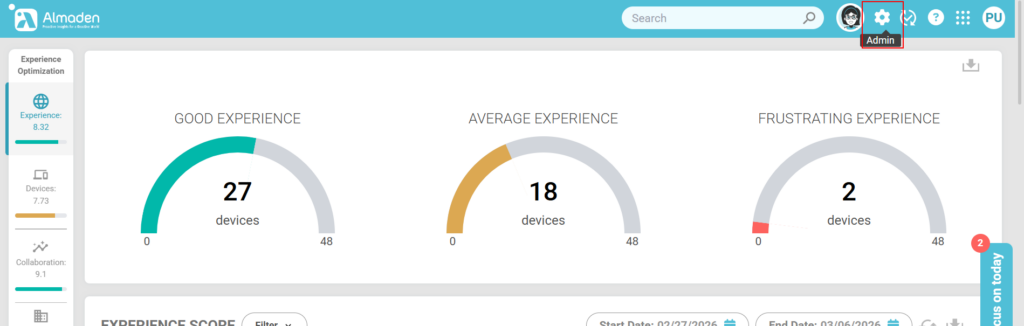
- Access Collective IQ DEX.
- In the main menu, navigate to:
- Admin → Users
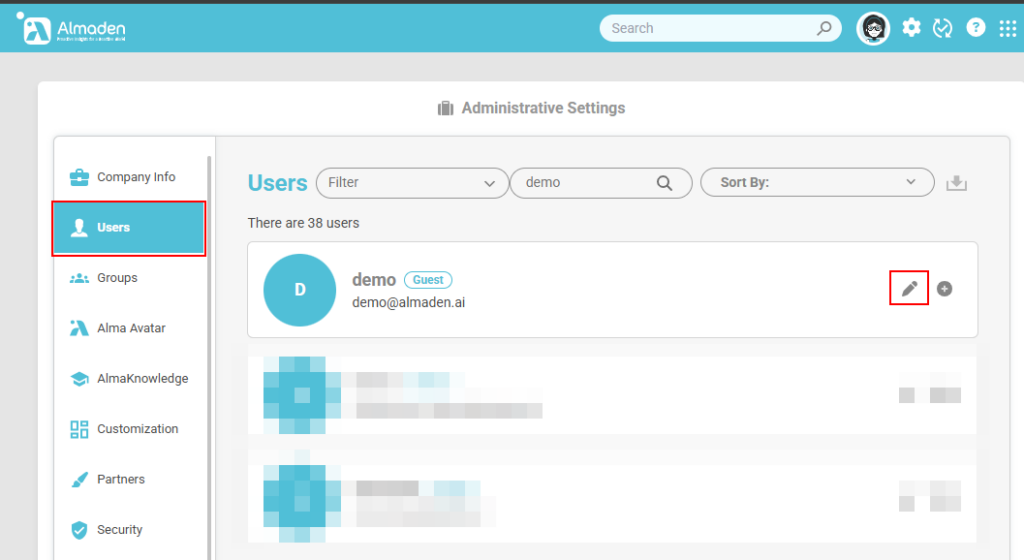
- Search for user.
- Click Edit.
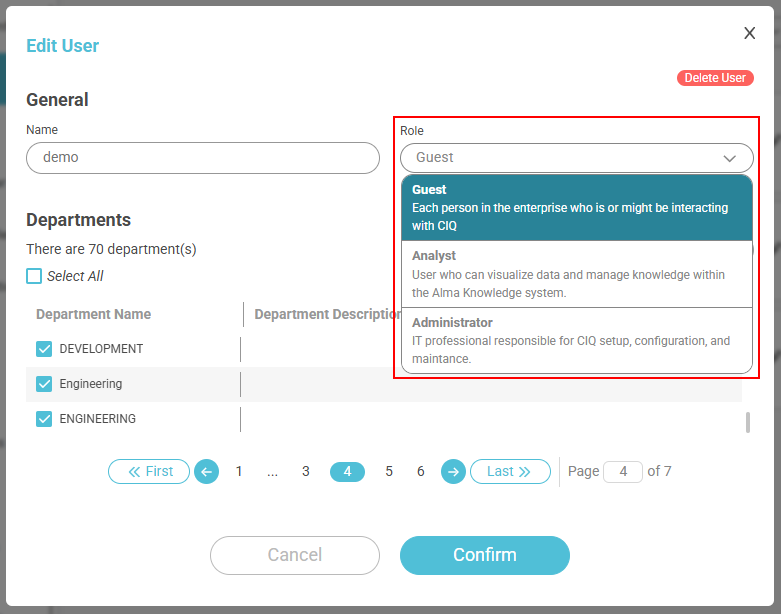
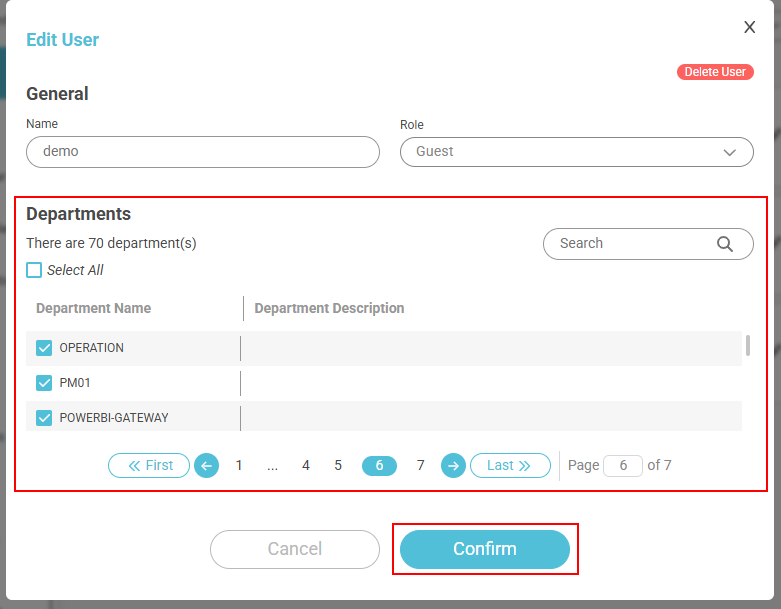
- Select the appropriate role and department for the user.
Access Roles
Guest
The Guest role is typically used for employees within the organization.
Permissions in Collective IQ DEX
Users with the Guest role can view devices only from departments associated with them within Collective IQ DEX.
Permissions in AlmaIQ
In AlmaIQ, Guest users can interact only with devices associated with them as users.
Important:
- Access does not include all devices in the department
- Access is restricted only to the user’s own device
Example Usage
An employee may ask:
- “Why is my computer slow?”
- “Is my disk full?”
- “Does my computer need an upgrade?”
Analyst
The Analyst role is intended for IT analysts or support teams.
Permissions in Collective IQ DEX
Users with the Analyst role can view metrics and data from devices belonging to departments associated with them.
Permissions in AlmaIQ
In AlmaIQ, analysts can ask questions only about devices that belong to departments they have access to.
This allows analysts to investigate issues within the scope of their departmental responsibility.
Example Questions
- “Which devices in the Finance department have less than 8GB of RAM?”
- “Which computers have disk usage above 90%?”
- “Which machines are showing high CPU usage?”
Administrator
The Administrator role is used by IT managers or platform administrators.
Permissions in Collective IQ DEX
Administrators can edit all configurations within Collective IQ DEX.
Permissions in AlmaIQ
In AlmaIQ, administrators can ask questions about any devices within the departments associated with them.
This enables a broader view of the IT environment for strategic analysis, governance, and asset management.
Example Questions
- “Which devices are out of warranty?”
- “Which departments have the most performance incidents?”
Configuration Best Practices
To ensure proper use of AlmaIQ:
- Assign the correct role to each user
- Configure the departments associated with analysts
- Use the Administrator role only for users responsible for platform management
This structure ensures secure access to information and proper IT data governance within Collective IQ DEX and AlmaIQ.
Conclusion
AlmaIQ transforms DEX and ITAM technical data into understandable answers using natural language.
The difference between Employees and IT Departments lies in the scope of information each profile can access:
- Employees use AlmaIQ to understand and improve the experience on their own device.
- IT Analysts use it to diagnose and solve problems within their departments.
- Administrators use it to manage and analyze the entire IT environment.
This approach democratizes access to technical information while maintaining control, security, and governance over corporate data.
