
AlmaIQ™ Licenses
AlmaIQ™ Licenses
Purpose
The AlmaIQ™ Licenses page allows administrators to monitor the usage of licenses provisioned for AlmaIQ™ services, review license consumption history, and view events related to license management within the environment.
Access
Step 1 – Access Administrative Settings
After signing in to the CIQ Portal, click the Admin icon located in the upper-right corner of the screen to access the Administrative Settings module.
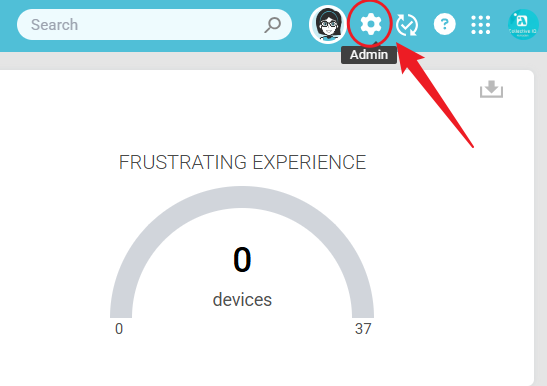
Note: Only users with administrative permissions can access this feature.
Step 2 – Open AlmaIQ™ Licenses
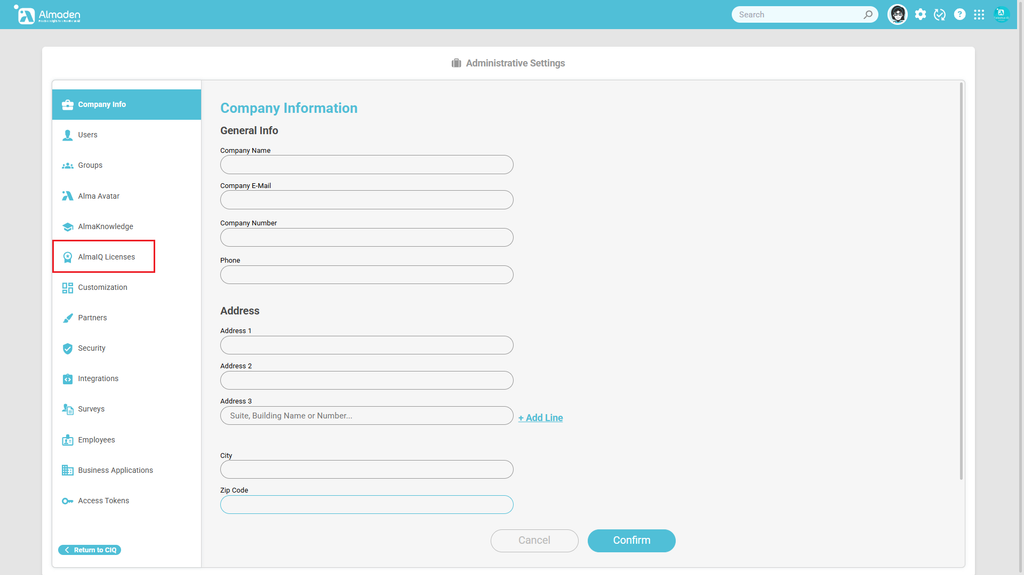
From the left-side navigation menu, select AlmaIQ™ Licenses.
This option opens the license monitoring and auditing page for AlmaIQ™ services.

Page Overview
The AlmaIQ™ Licenses page centralizes information related to the consumption and management of licenses provisioned for AlmaIQ™ services.
The interface is divided into the following sections:
- License Information
- License Usage History
- Transaction History
1. License Information
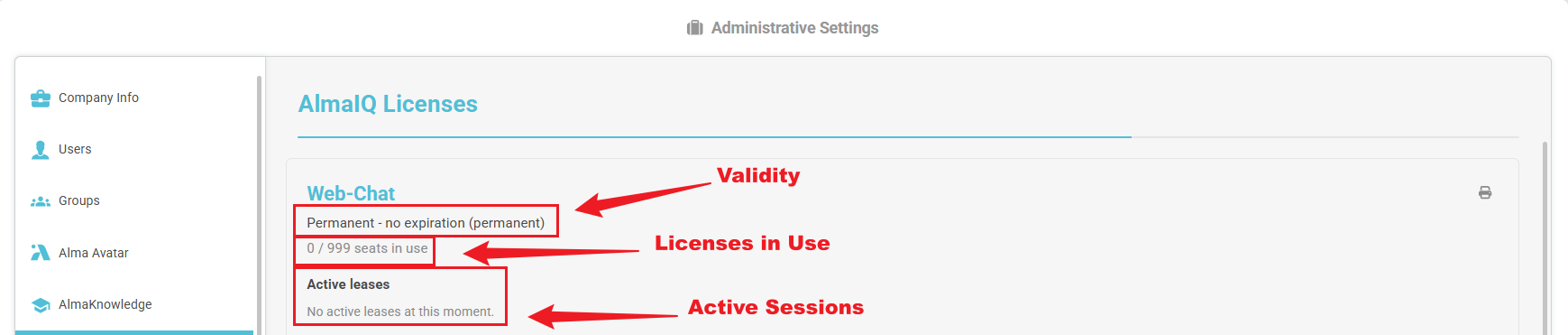
This section provides a summary of the license provisioned for the environment, including validity, usage, and active session information.
Available Fields
| Field | Description |
|---|---|
| Validity | License type and validity status. |
| Licenses in Use | Number of licenses currently in use compared to the total number of provisioned licenses. |
| Active Sessions | Indicates whether there are active sessions consuming licenses at the time of the query. |
Example
| Field | Value |
|---|---|
| Service | Web-Chat |
| Validity | Permanent – No expiration |
| Licenses in Use | 0 / 999 licenses in use |
| Active Sessions | No active sessions at this time |
In the example above, the Web-Chat service has a permanent license with 999 provisioned licenses, and no licenses are currently being used.
2. License Usage History
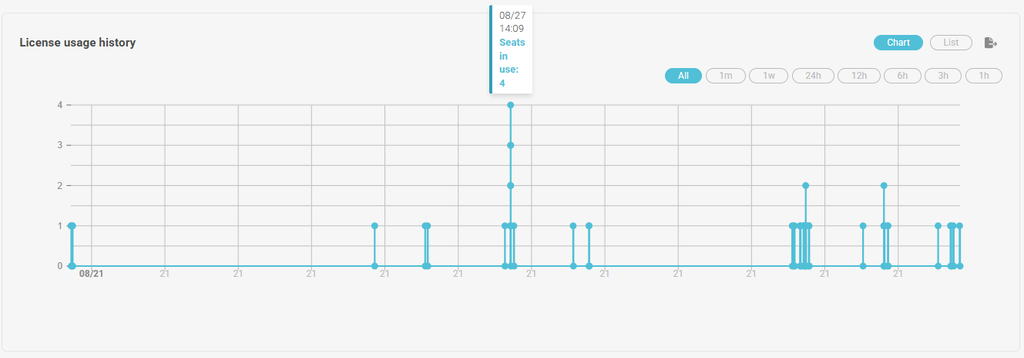
The License Usage History section provides a time-based view of license consumption events recorded by the system.
Data can be displayed in graphical or list format, allowing administrators to analyze service usage trends over time.
View Modes
- Graph
- List
Time Filters
The chart supports multiple time ranges, including:
- Recent activity (1h to 24h)
- Short-term analysis (1 week to 1 month)
- Complete historical view (All)
This flexibility allows administrators to analyze usage patterns at different levels of detail.
Use Cases
- Monitor license utilization.
- Identify periods of peak usage.
- Evaluate service adoption trends.
- Support capacity planning and license sizing activities.

3. Transaction History
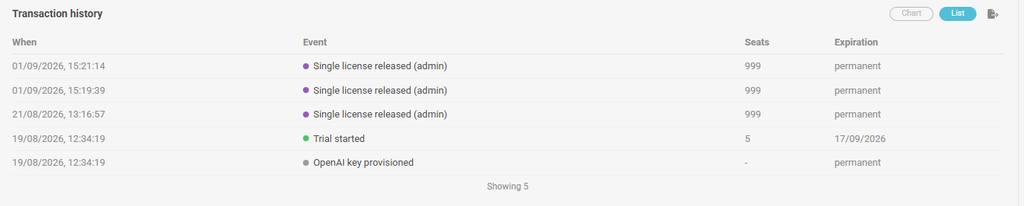
The Transaction History section records events related to the provisioning, release, and management of licenses within the environment.
These records support operational traceability and auditing processes.
Available Information
| Field | Description |
|---|---|
| Date/Time | Date and time when the event was recorded. |
| Event | Description of the recorded action. |
| Licenses | Number of licenses affected by the event. |
| Expiration | Expiration date associated with the record, when applicable. |
Example Events
- Individual license released.
- Trial period has started.
- OpenAI key provisioned.
- License provisioning events.
- License availability changes.
Historical records remain available for consultation and auditing purposes, providing visibility into license-related activities within the environment.

Benefits, Permissions, and Licensing
Benefits
The AlmaIQ™ Licenses page provides administrators with a centralized view of license utilization and related activities across the environment.
Key benefits include:
- Centralized visibility of provisioned licenses.
- Monitoring of license utilization and availability.
- Access to historical license consumption data.
- Traceability of license-related events and transactions.
- Support for auditing and governance activities.
- Assistance with license capacity planning and management.
Permissions
Access to the AlmaIQ™ Licenses page is restricted to users with administrative privileges.
Users without the required permissions will not see the AlmaIQ™ Licenses option within the Administrative Settings menu.
Acquiring AlmaIQ™ Licenses
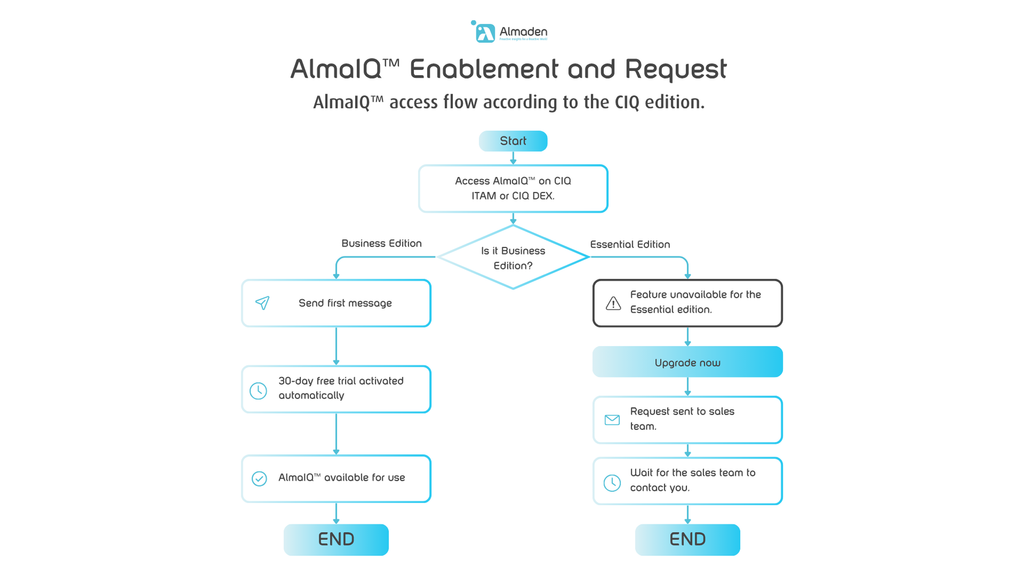
If additional AlmaIQ™ licenses are required, follow the process below based on the account type associated with your environment.
License Request Flow
Account Type Guidance
| Account Type | Process |
|---|---|
| Business | Submit an AlmaIQ™ request through the CIQ Portal. |
| Essentials | Contact the Account Team to request AlmaIQ™ licensing. |
Once the request has been reviewed and approved, the required licenses will be provisioned and become available within the AlmaIQ™ environment.
