
KNOWLEDGEBASE
CORTEX
Overview
Cortex is the knowledge intelligence framework within CIQ Cloud that enables users to discover, explore, analyze, and interact with organizational knowledge through AI-powered capabilities.
Cortex centralizes knowledge assets and provides tools that help users search documentation, investigate operational questions, explore relationships between information, and measure knowledge effectiveness across the platform.
The feature exists to improve knowledge accessibility, reduce research time, support operational decision-making, and ensure organizational knowledge can be efficiently consumed and maintained.
Within CIQ Cloud, Cortex consists of four primary components:
- Library – Knowledge repository and content management.
- Investigate – Conversational knowledge exploration.
- Graph Explorer – Relationship visualization and entity discovery.
- Analytics – Knowledge performance and usage analytics.
Together, these components provide a complete knowledge management and intelligence solution.
Navigation
CIQ Home > Knowledgebase > Cortex
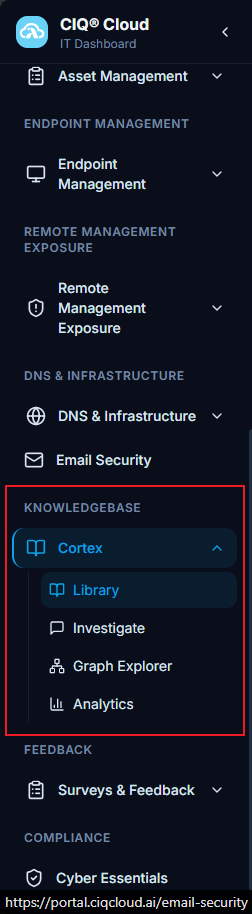
Main Page Overview
The Cortex workspace allows users to manage and consume knowledge from a single location.
Users can:
- Access knowledge assets stored in the Knowledge Library.
- Ask operational questions using natural language.
- Explore relationships between knowledge entities.
- Review knowledge usage and effectiveness metrics.
- Identify content gaps and improvement opportunities.
Each section supports a different stage of the knowledge lifecycle, from content storage and retrieval to analysis and continuous improvement.
Library
Purpose
The Library serves as the centralized repository for documents and knowledge assets used by Cortex.
It provides a structured location where knowledge can be stored, organized, searched, and maintained. The Library ensures users have a single source of truth for operational procedures, technical documentation, and organizational knowledge.
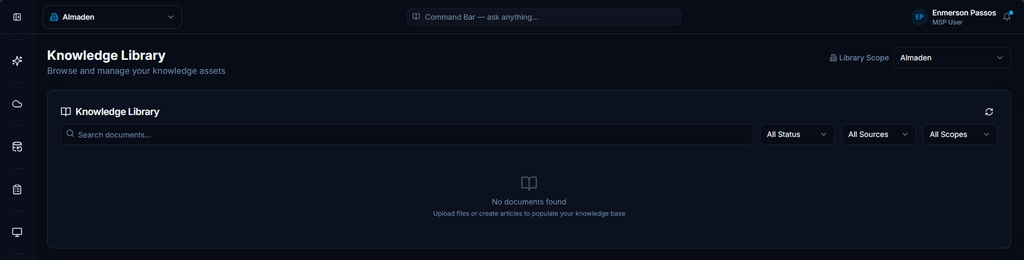
Fields and Configuration
Search Documents
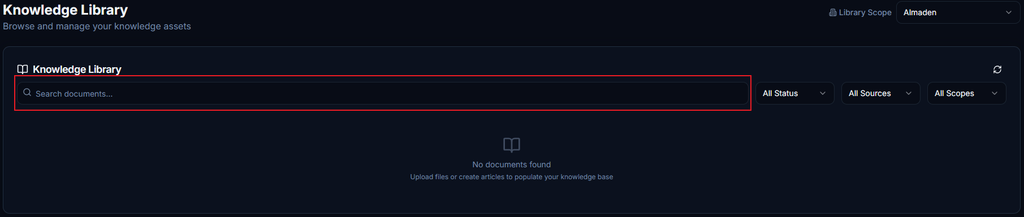
- Purpose: Locate documents and knowledge assets stored within the selected library.
- Behavior: Filters results using entered search criteria.
- Operational Impact: Reduces time spent locating relevant knowledge resources.
Status
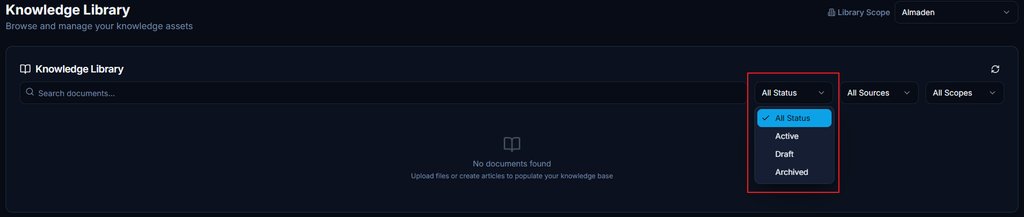
- Purpose: Filter documents based on their lifecycle state.
- Behavior: Displays only records matching the selected status.
- Operational Impact: Helps users focus on active or reviewable content.
Source

- Purpose: Filter content by originating knowledge source.
- Behavior: Limits results to selected content repositories.
- Operational Impact: Improves navigation when multiple knowledge sources exist.
Scope

- Purpose: Restrict displayed content to a specific knowledge scope.
- Behavior: Shows documents associated with the selected scope.
- Operational Impact: Ensures users work with relevant customer, tenant, or organizational knowledge.
Investigate
Purpose
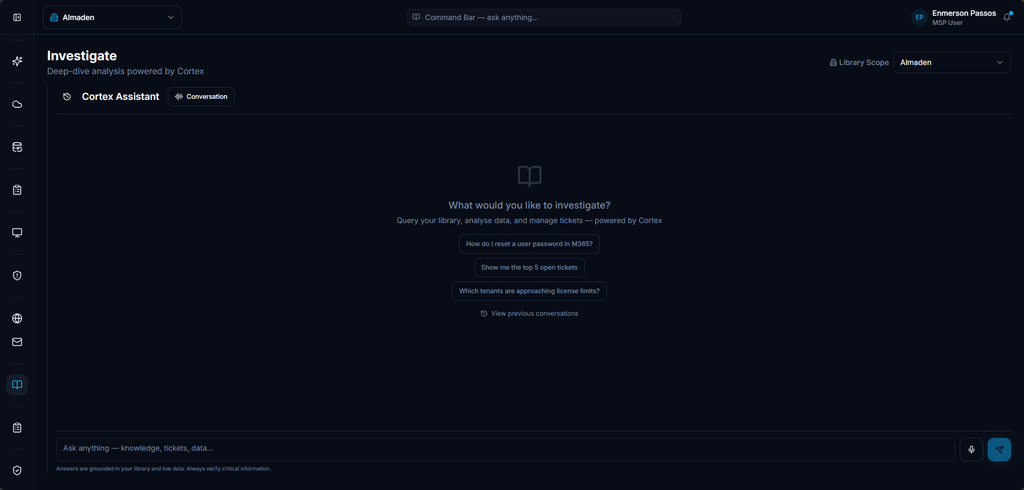
Investigate provides a conversational interface that allows users to interact with Cortex using natural language.
Rather than manually browsing documents, users can ask questions and receive contextual answers generated from available knowledge assets, tickets, operational information, and platform data.
This functionality supports research, troubleshooting, operational investigations, and knowledge discovery.
Cortex Assistant
Purpose
The Cortex Assistant serves as the primary interaction mechanism for investigations.
Users submit questions and receive responses based on data available within the selected knowledge scope.
The assistant helps transform knowledge into actionable information without requiring users to manually search multiple data sources.

Fields and Configuration
Ask Anything
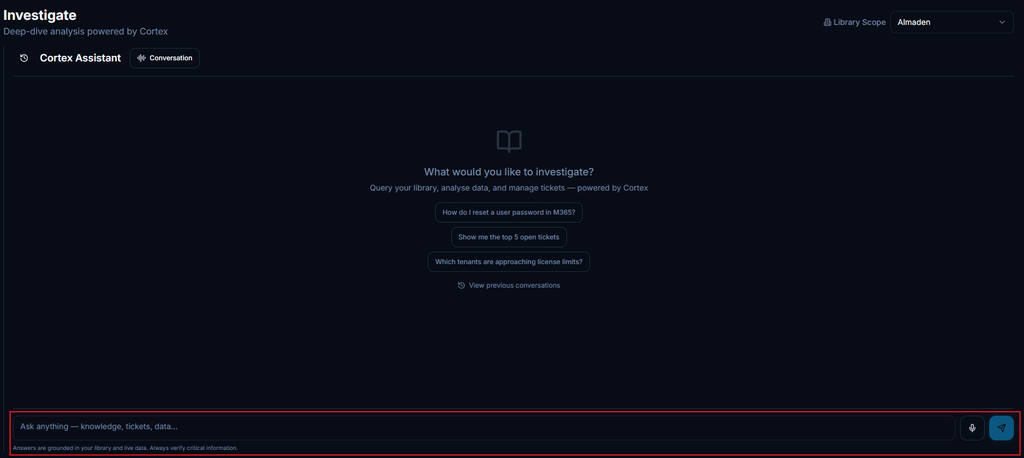
- Purpose: Submit natural language questions.
- Behavior: Searches available knowledge sources and generates contextual responses.
- Operational Impact: Accelerates research and issue resolution.
Available Information Sources
- Knowledge Articles
- Tickets
- Operational Data
- Platform Information
Library Scope

- Purpose: Defines which knowledge repository Cortex can use during an investigation.
- Behavior: Restricts responses to information available within the selected scope.
- Operational Impact: Directly impacts response accuracy and relevance.
Example:
- Almaden
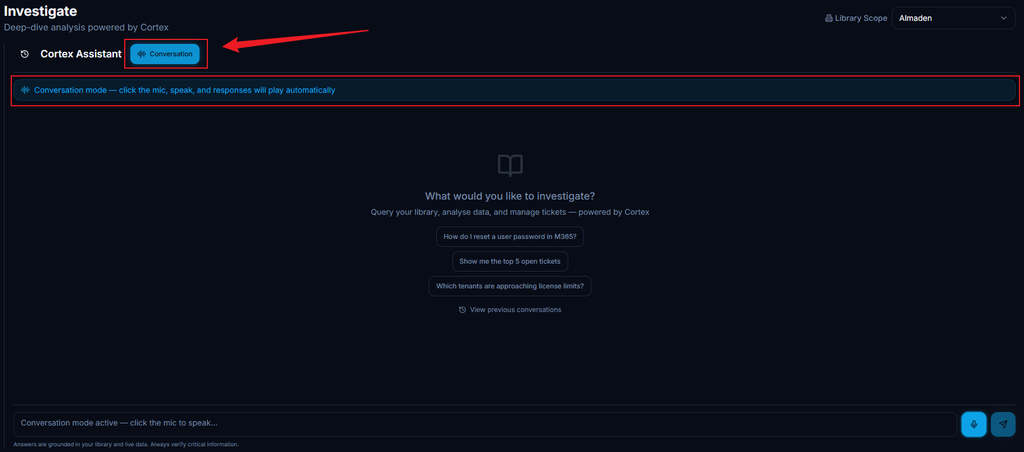
Conversation Mode
Purpose
Displays the active investigation session, including previous questions and responses.
Conversation history remains available throughout the investigation, allowing users to build upon prior findings.
Operational Impact
Enables iterative investigations without needing to restart the discovery process.
Suggested Queries
Purpose
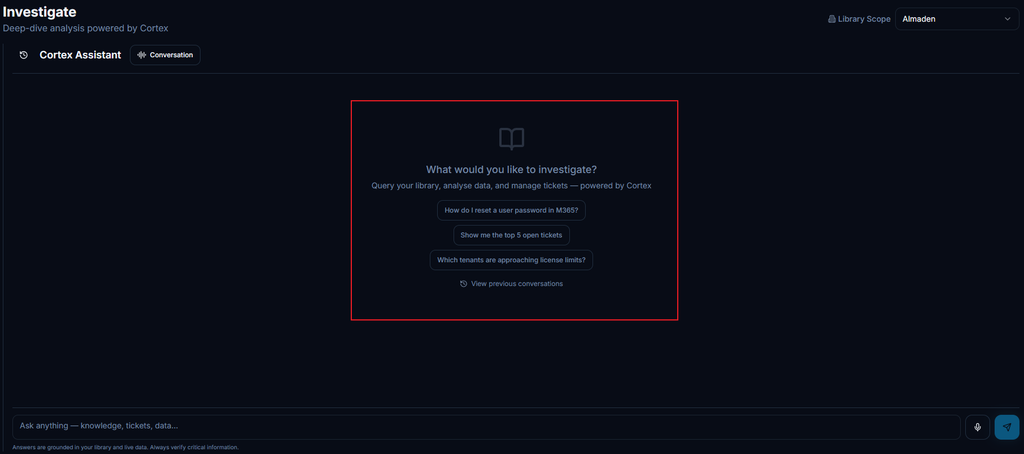
Provides examples of supported questions to help users begin an investigation.
Suggested queries demonstrate how Cortex can be used and reduce the learning curve for new users.
Example:
How do I reset a user password in M365?
Operational Impact
Encourages effective use of the platform and helps users understand supported query types.
Graph Explorer
Purpose
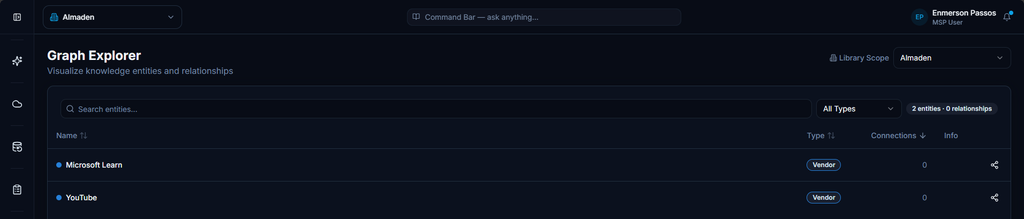
Graph Explorer provides a visual representation of knowledge entities and their relationships within Cortex.
The feature helps users understand how information is connected and enables exploration of related entities across the knowledge ecosystem.
It supports investigation, impact analysis, and contextual discovery.
Entity List
Purpose
Displays all entities available within the selected library scope.
Available Information
- Name
- Type
- Connections
Operational Impact
Provides an overview of available entities and their relationship density.

Fields and Configuration
Name
- Purpose: Identifies the entity.
- Behavior: Displayed as the primary label in the graph.
- Operational Impact: Helps users locate specific entities.
Type
- Purpose: Indicates entity classification.
- Behavior: Categorizes entities by content type.
- Operational Impact: Helps users understand the nature of stored information.
Connections
- Purpose: Displays the number of relationships associated with the entity.
- Behavior: Reflects relationship density within the graph.
- Operational Impact: Helps identify highly connected entities.
Entity Types
Purpose
Displays the classification assigned to individual entities.
Examples:
- Vendor
Operational Impact
Helps users distinguish different categories of information stored within Cortex.
Search Entities
Purpose
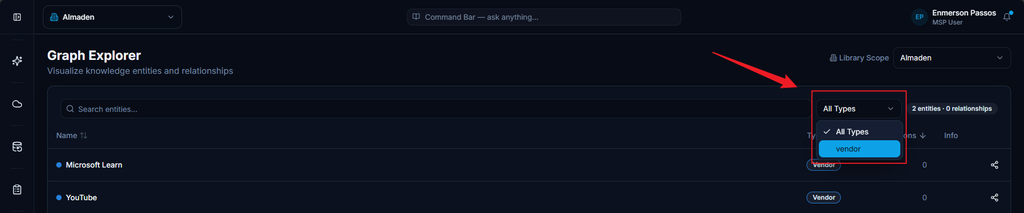
Allows users to locate specific entities within the knowledge graph.
Fields and Configuration
Search
- Purpose: Locate entities by name.
- Behavior: Filters displayed results.
- Operational Impact: Simplifies navigation within large graphs.
Type Filter
- Purpose: Restrict results by entity classification.
- Behavior: Displays only entities matching the selected type.
- Operational Impact: Improves analysis efficiency.
Entity Details
Purpose
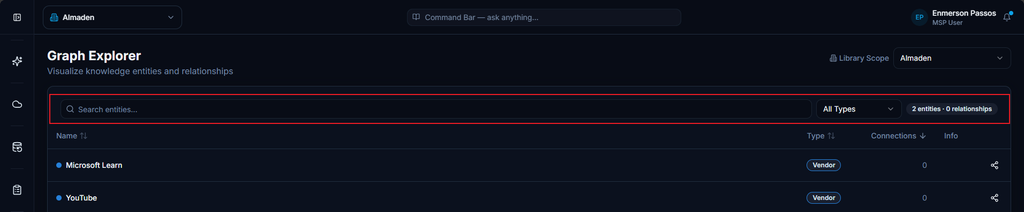
Displays detailed information for the selected entity.
Available Information
- Entity Name
- Type
- Relationships
Operational Impact
Provides additional context and visibility into related information.

Analytics
Purpose
Analytics provides visibility into knowledge quality, usage patterns, content performance, investigation trends, and potential knowledge gaps.
The section helps administrators understand how Cortex is being used and identify opportunities to improve knowledge coverage and response quality.
Summary
Purpose
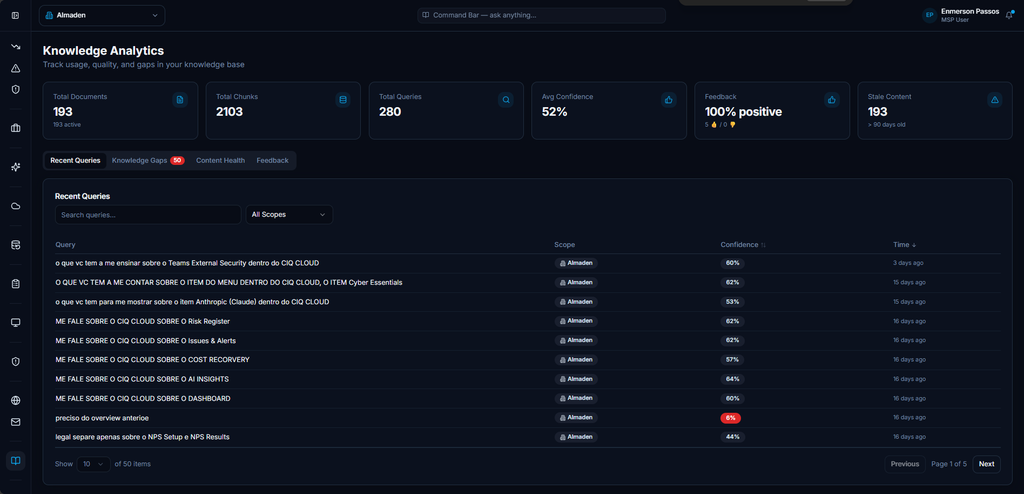
Provides a high-level overview of knowledge base health and activity.

Fields and Configuration
Total Documents

- Purpose: Displays the number of available knowledge documents.
- Behavior: Updates as content is added or removed.
- Operational Impact: Indicates overall knowledge base size.
Total Chunks
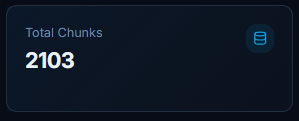
- Purpose: Displays the number of indexed knowledge segments.
- Behavior: Reflects content available for retrieval.
- Operational Impact: Represents searchable knowledge volume.
Total Queries

- Purpose: Displays the number of Cortex investigations performed.
- Behavior: Increases as users submit questions.
- Operational Impact: Measures platform adoption and usage.
Average Confidence

- Purpose: Displays the average confidence score associated with responses.
- Behavior: Reflects knowledge quality and relevance.
- Operational Impact: Helps evaluate overall response reliability.
Feedback

- Purpose: Displays user feedback volume.
- Behavior: Tracks feedback activity.
- Operational Impact: Helps assess user satisfaction.
Stale Content

- Purpose: Identifies content requiring review or updates.
- Behavior: Highlights outdated knowledge assets.
- Operational Impact: Supports content governance and maintenance.
Available Views
Analytics includes the following views:
- Recent Queries
- Knowledge Gaps
- Content Health
- Feedback
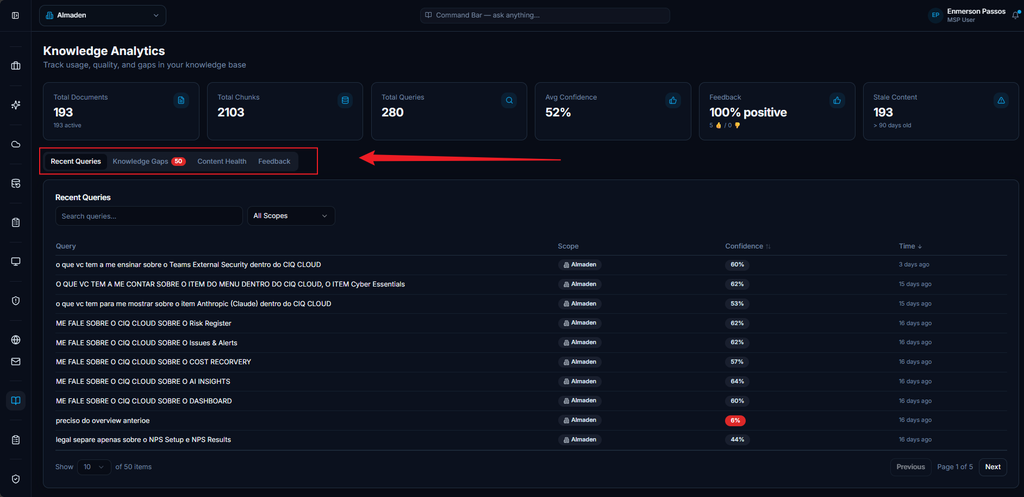
Recent Queries
Purpose
Displays recently submitted Cortex investigations.
Available Information
- Query
- Scope
- Confidence
- Time
Operational Impact
Provides visibility into frequently researched topics and recent user activity.

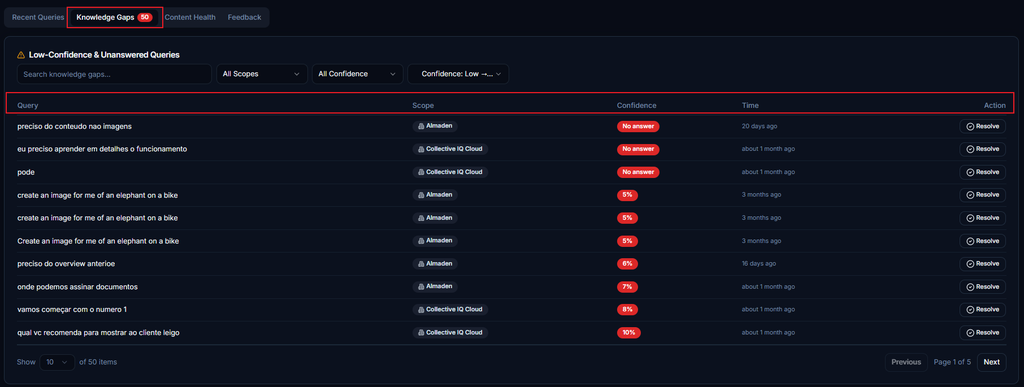
Knowledge Gaps
Purpose
Identifies questions where available knowledge may be incomplete or insufficient.
Operational Impact
Helps administrators prioritize new documentation and improve knowledge coverage.
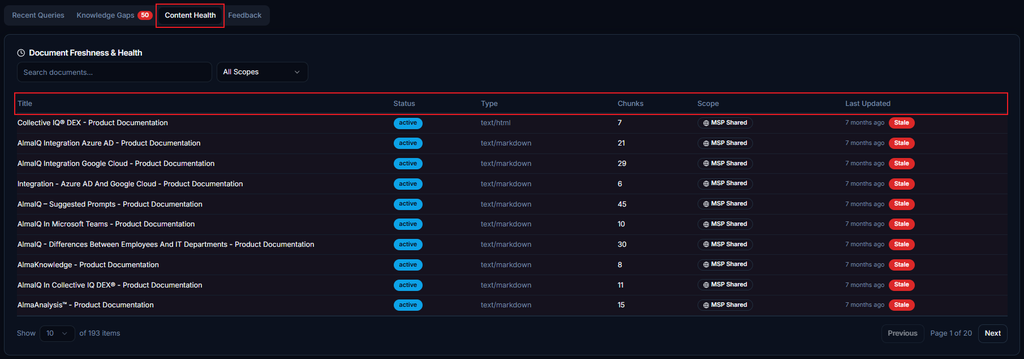
Content Health
Purpose
Provides insight into knowledge quality and maintenance status.
Available Information
- Content Coverage
- Confidence Trends
- Stale Content
Operational Impact
Supports continuous improvement of the knowledge repository.
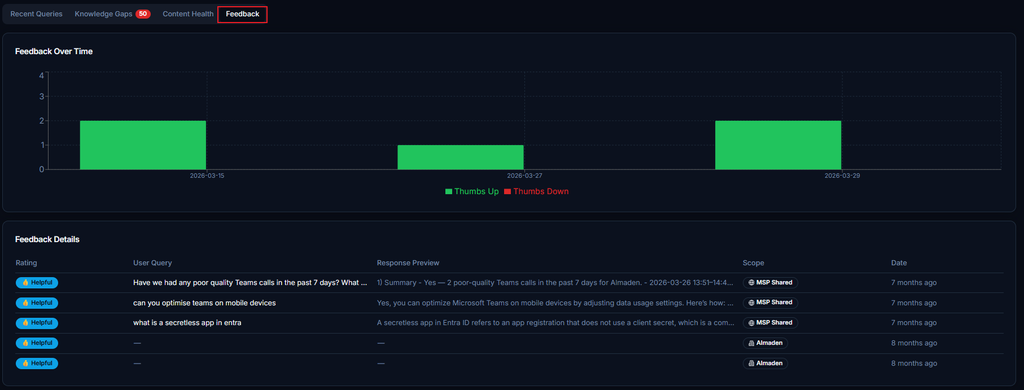
Feedback
Purpose
Displays feedback submitted on Cortex-generated responses.
Operational Impact
Helps identify areas where response quality or knowledge coverage can be improved.
Important Notes
- Library Scope directly affects the information available to Cortex.
- Search filters help narrow large knowledge repositories.
- Investigate maintains conversation context during active sessions.
- Graph Explorer only displays entities available within the selected knowledge scope.
- Confidence metrics help evaluate the quality of Cortex responses.
- Knowledge Gaps should be reviewed regularly to improve documentation coverage.
- Stale Content indicators help maintain knowledge accuracy over time.
